Tuesday, June 26, 2018

AI helping us be more ethical.


With the advent of self-driving cars, we see AI starting to make ethical decisions. How you may ask? 

These automobiles will have to decide what to do when human lives are at stake. For example, let's say a couple is in a hurry. Instead of obeying the traffic signal to not cross the street, they attempt to cross it not seeing the oncoming vehicle. Moreover, this is a self-driving car that is about to hit them. The AI calculates that it does not have enough time to come to a safe stop. In a millisecond the AI reviews the scenario. Should the ethic algorithms decide to hit the single pedestrian on the side walk instead? Hit the couple crossing the street? Or risk the life of the passengers in the car as well as those in the neighboring office building by careening into it?

Let's take this concept a step further. What if the AI knows who all the humans are that are in danger via face recognition? Also, what if the algorithms instantly calculate that one of the people in peril crossing the street has a high proclivity to criminal behavior?

Once intelligent machines start making, at least hypothetically better and more informed ethical decisions based on data, will we then slowly start to hand over our own ethical decisions to them? Why not have an AI (artificial intelligence) that has access to massive amounts of information and can process it at a thousand fold rate more then we can at least assist us in those dilemmas?

Tuesday, June 19, 2018

Less is More?

Blaise Pascal famously wrote, "I would have written a shorter letter, but I did not have the time." 


It takes effort to be brief. Speaking of that, I listen to various podcast throughout the day. One that I listen to is only one minute in length. What is interesting is that I find myself really concentrating as I listen to it. I will listen to it attentively, because it only takes a minute time, and I can afford that effort during my busy day. Moreover, I will soon have another minute to listen to it again. Secondly, I want to make sure I get that singular thought that is communicated from that one minute podcast. What I end up doing with the other podcasts that are 15 minutes to 1 hour in length is listening to them one time and even speeding up the listening process only to not hear them again. 

Why is it I pay more attention and listen more carefully to the shorter podcast? 

First, it simply takes less time. Next, because there is only a singular idea or concept contained, I want to make sure that I obtained what is so briefly being shared. 

In short, I likely spend more time listening to and then considering the shorter podcast than I do with the longer!


Thursday, May 31, 2018

Are You, Like the Emerging AI, More than the Sum of your Parts?


I recently subscribed to Medium. What I typically do is take the daily email from Medium, browse through what articles, and if I find something of interest, I save that to Instapaper to read and more commonly listen to with Instapaper's audio feature on its mobile app.

I was listening to an article, On Metamodernism by Seth Abramson. In that article he stated that, "people reduce you to your data in a way that’s soul-crushing." Immediately, what came to my mind was the Aristotelian quote, "The whole is more than the sum of its parts"

A week or so later, I was listening to the Triangulation Podcast from This Week in Technology, that featured the new book, The Fourth Age: Smart Robots, Conscious Computers, and the Future of Humanity by Byron Reese. Reese seemed optimistic and also realistic in his assessment of Artificial Intelligence (AI) and its current and potential interaction with humanity.

My typical process, after hearing of a book that I would like to read/hear is to check on my local library's web site to see if the audio or ebook is available. It did not have either. However, the Overdrive app that it uses does have the ability to recommend an audio or ebook. So, I recommend the audio book, which also puts you first in line to borrow the resource. A few days later, I get an email stating that my local library, which I love by the way, purchased the audio book and that I can start accessing it at will.

Again, my modus operandi is to run in the morning, listening to audio books and/or podcasts. So, the next morning after downloading the audio book, I am moving along listening. At the very outset Reese brings up the philosophical discussion of monism vs dualism or what is more frequently termed the mind/body problem. Before we look at these ideologies, note that where you fall on that continuum will influence your consideration of the possibility of AI becoming conscious.

To be sure, these views span a continuum. But, for discussion sake and for clarity, let's look at the two systems in contrast. Concerning consciousness,  the earliest discussions of dualist ideas are found in the writings of Plato who held that intelligence could not be identified with, or explained in terms of, their physical body. The best-known version of dualism comes from RenĂ© Descartes (1641), who held that the mind is a non-extended, non-physical substance, and separate from the physical brain. To be sure, the brain is necessary for both schools of thought, however, for the dualist consciousness or the mind "emerges" from the physical brain.

In short, a simplistic understanding is if you think that you are no more than the sum of your parts then you are a monist. Material is all that there is. Your sense of self consciousness is nothing more than a "trick" of your brain. In contrast, if you think that you are more than the sum of your physical make up, then you are a dualist and consciousness "emerges" from the brain.

So, a monist would typically respond that of course AI systems can become conscious given they possess the same physical properties that our human brain possesses. However, the dualist would say, "Hold on here, how do we know if there has been an emergent product of those physical properties that is like human consciousness or do they simply mimic the characteristics of consciousness?"

What do you "think?"


Thursday, May 24, 2018

Brotopia: It's Bad for Everyone

I recently listened to the audio book Brotopia: Breaking Up the Boys' Club of Silicon Valley by Emily Chang during my morning jogs. 

My initial thought as I started to listen to the book was that the under representation of women and minorities in Tech was due to not as many women and minorities pursuing STEM degrees and programs as white men. Boy, (pun intended) was I wrong! 

Romans of the Decadence (1847), by Thomas Couture, as updated to parody Silicon Valley’s male-dominated sexual and sexist culture. Photo Illustration by Darrow.


What I found out from the book is that not only is there inequality but also a toxic culture of white, privileged males that are intentionally or at least subconsciously barring others who look different than they do from entering and taking part in the fast and furious tech world of Silicon Valley. 

While Cincinnati, Ohio is not Silicon Valley, there is still has a good deal of tech based businesses as well as insurance and banking companies that are essentially IT organizations. What this means is there is ample opportunities here for the alienation of women and minorities by white males such as myself.

What I hope to take away from this book is to learn how I am contributing to the problem and put an immediate stop to it. With that stated, before being exposed to Brotopia, I did not consider myself as part of the problem, however after listening to this book I am now aware that, in fact, that is likely not true. While not desiring to actively suppress others, I no doubt have committed sins of omission by not combatting the toxicity. 

In short, I hope to be active in two ways. First, encourage and assist my co-workers and associates in tech that look different than me. This can be done by making sure that they know that I am listening to them, that I in fact prize their input, and that they are a value to the team. While I "think" I have been doing that, I no doubt have been remiss in actively communicating that I know they are smart and productive.

Secondly, I could be proactive in seeing that women and minorities enter the tech field via helping the various groups that have emerged in the last 5 years such as Girls Who Code. Here, I can volunteer time and resources. Also, as an Adjunct Instructor at a local university teaching a programming class to Business Informatics students, I can encourage the women and minorities in the class to push forward and fight the good fight. 

What has been most painful in listening to the book is putting myself in the place of many who while working endless hours in a taxing industry, had to battle the emotional stress of the many sexist and mean comments, sexual advances, belittements, and generally being demeaned and alienated all the while trying not only to advance, but also to survive. 

Ms. Chang is correct in her hope for her sons to work and thrive in whatever future they choose. Believe me, the same type of persons that create a toxic environment for women and minorities, often bully and demean their male coworkers we well. Truly, "If one is oppressed, all are oppressed."

Updating pgAdmin 4 on Ubuntu 16.04

When I opened pgAdmin on my Ubuntu 16.04 system this morning and received a notification that there was a new version, 3.0. So, in order to upgrade I did the following:
 $ virtualenv -p python3 pgadmin4   
 $ cd pgadmin4   
 $ source bin/activate   
 $ pip3 install https://ftp.postgresql.org/pub/pgadmin/pgadmin4/v3.0/pip/pgadmin4-3.0-py2.py3-none-any.whl  

The *.whl (wheel file) above is a ZIP-format archive with a specially formatted filename and the .whl extension and is a built-package format for Python. Go to https://www.postgresql.org/ftp/pgadmin/pgadmin4/ for the latest python wheel files.

All looked good until I opened the new version and attempted to run the Query Tool. Whenever I try to open the Query Tool by going through the drop down Tools menu, I would receive the error dialog "Query Tool Initialize Error."


By experimenting I found that instead of browsing to http://12.70.0.1:5050, when I changed the URL to http://localhost:5050, I was able to use the Query Tool via the drop down menus.

Therefore, what I did was edit the pgAdmin4/lib/python3.5/site-packages/pgadmin4/config.py file by updating the line:
 DEFAULT_SERVER = '127.0.0.1'  
to
 DEFAULT_SERVER = 'localhost'  
Now when I start pgAdmin, all is good.


Tuesday, May 08, 2018

Cross Platform Test Code Coverage for .NET Core: Coverlet

I ran across a post on Medium, entitled, Setting up Coveralls with Coverlet for a .NET Core project. This brief and informative article details the setup and use of this new library from Toni Solarin-Sodara.  


As per the instructions, I issued the following from the prompt:
dotnet add package coverlet.msbuild
Here was the result:

Then, to update everything, I ran dotnet restor to update the dependencies:


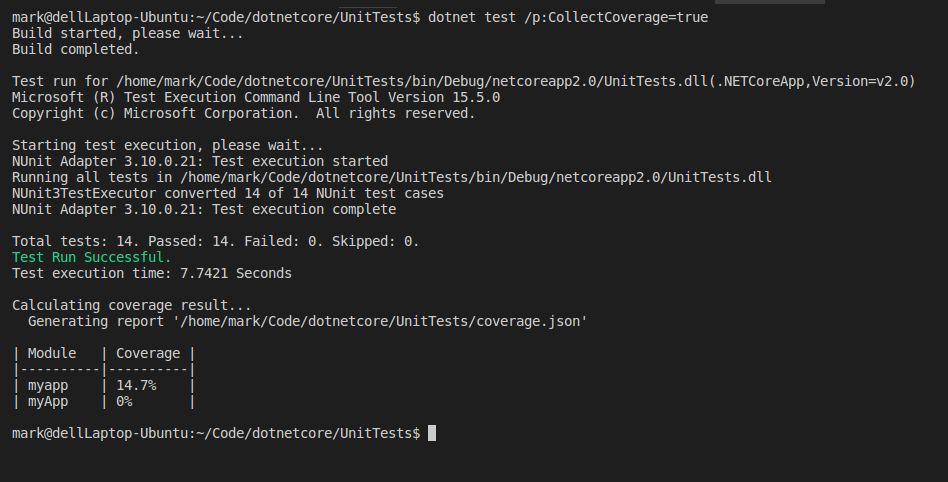
The next step per the above article was to issue the dotnet test command to set the CollectCoverage property to true:
dotnet test /p:CollectCoverage=true
Here is the output:


As you can see from the output, I need to create more unit tests to increase coverage! In any event, to see the latest code up close, go to the unit tests github repository.


Friday, May 04, 2018

Encouraging the Wisdom of the Collective - The Up Vote

We have long known that the wisdom and experience of the many is greater, due simply to number and volume, than that of the few. This echoes the line from Star Trek II: The Wrath of Kahn movie (1982) where Spock sacrifices himself for the entire ship and shares that statement with Captain Kirk that, "The needs of the many, outweigh the needs of the few."


The concept of more knowledge existing in the collective than in the individual is not a new idea sparked by the information age. We see it as early as Aristotle and also reflected 13 years ago with James Surowiecki's book, The Wisdom of Crowds: Why the Many Are Smarter Than the Few and How Collective Wisdom Shapes Business, Economies, Societies and Nations.


It is when I am prompted by a coding challenge that I best experience the knowledge of the collective. It is not that I do not try to solve the current dilemma myself. In fact, I will often spend ample time trying to come up with a solution. However, after I realize that I have exhausted what I know to do, I go to the the wisdom of the many, namely Google or Bing

One of the best sites for collective intelligence long known to software developers is Stack Overflow

I have recently realized that after finding answers to a coding problem from the collective, that I typically test the information, see that it works, and then get on with the next challenge without voting up the solution from the collective. A solution, by the way, that saved me both time and stress. 

What is voting an answer up? Per Stack Overflow, "When you vote up, you are moving that content 'up' so it will be seen by more people." In short, others will see this solution sooner that likely have the same issue and will likely be helped sooner than later. Also, "Upvotes on a question give the asker +5 reputation [points]. Upvotes on an answer give the person that answered the question +10 reputation [points]. 

Therefore, it just seems like the right thing to do when you find the answer to your problem to click the up arrow as a matter of giving those who researched and worked hard to provide the answer reputation points as well as encouragement to continue to help. The goal, be more consistent in up voting the helpful answers before running onto the next challenge so that the collective is supported and encouraged. 


Wednesday, May 02, 2018

Interstitial Journaling...whaaaaat?


​I ran across an interesting post entitled, Replace Your To-Do List With Interstitial Journaling To Increase Productivity by Coach Tony. My initial reaction was whaaaaaat Journaling? I have to admit that I had to look this adjective up in the dictionary. Per merriam-webster.com the word is defined as: "pertaining to, situated in, or forming interstices." OK, that did not help. What is an interstices? Again, per merriam-webster.com interstices is defined: 
"1 a space that intervenes between things; especially : one between closely spaced things....2 : a short space of time between events." Therefore, Interstitial Journaling is a form of writing that one does between certain events or milestones.

I have long been a fan of writing a daily journal. I have been using 750words.com for sometime. In fact, I have long enjoyed its analysis of my content along with its badge system.


However, the idea of journaling when in between the steps of executing a plan is novel to me. After considering it, the value of introspection and writing those thoughts before moving to the next stage in a plan is beneficial. What am I thinking right now at this phase? What went well the last hour? How was I most effective this time in that task? It is during those short breaks that you can use the exercise of journaling to recognize what just happened, or did not happen, and to have an honest, revealing, and education about one's self.

Tony states, "Anyone who has ever done journaling in other contexts knows this — your journal is an opportunity for truth and honesty about yourself that you don’t normally have. I’m too ambitious about what I take on, while being cowardly about working hard. Putting those thoughts into a journal moves them from feelings that secretly rule my decisions to rational concepts that I can analyze and solve."

Moreover, we often think we commonly make rational decisions and are guided by facts as we move through our day. However, upon close examination, this may not be the case. Per the Coach, "I almost never explain any productivity topic without referencing the book, Thinking, Fast and Slow. The book covers two modes of decision making. One is a rational but effortful mode. This is what we wish ruled our life. The other is an emotional and habitual mode that sits just below our consciousness. This is what actually rules our life. The magic of journaling is that it is almost always effective at bringing thoughts and feelings up to a place that triggers your rational mind. The net effect is that you’re rebalancing and being more rational."

Therefore, instead of just journaling at one part of the day, morning or evening, I think I will journal throughout the day and/or between the day's tasks. Sounds rational, right?

Friday, April 27, 2018

ASP.Net Core 2 with Postgresql on Linux Part 11: Deploying to Heroku via Docker

In Part I, I discussed the rationale for porting a ASP.Net Core 2 app to my Linux system replacing SQL Server with Postgresql and place it on Heroku. 

With Part II, we transferred the SQL Server data to Postgres.


In Part III, I create the ASP.Net MVC Core 2.x app, from which we will proceed, and get Entity Framework Core installed.


Then in Part IV, I look at the configuration differences between the ASP.Net MVC app that uses SQL Server and the new app, in preparation of porting the old app to use Postgresql.

Part V, we compared the differences in both the projects' structures and ported the existing project code, starting with the data model layer, to the new project. In addition to this, we got the jquery.countdown jquery plugin installed, that is used to implement a JavaScript timer. More on that in a later article. Finally, we used the dotnet ef dbcontext scaffold command that builds a DbContext and entity types for out Postgresql database. And, oh yes, we added the project to github, which frankly should have been done day one.


In Part VI, we got the NUnit testing framework in place 
in order to test both the new and future code.


Part VII, saw the Service layer setup along with its unit tests.

In Part VIII we imported the Controller classes from the existing app and setup unit tests for them.

Then in Part IX, we migrated the Razor (*.cshtml) files as well as the associated JavaScript, Cascading Style Sheet (CSS), and image files from the existing app.

Part X detailed the Program.cs and Startup.cs files as well as the appsettings.json and project files (*.csproj) content that was then migrated and updated from utilizing SQL Server to accessing Postgresql for data.

Now to deploy this new app to Heroku with Docker from Visual Studio Code on my Ubuntu 16.4 laptop.

First, you will need to download and install the Heroku CLI for your system. Go here for instructions. Then create a Heroku account.


Next, make sure you have Docker installed. Start here.


A quick thing to note is that I renamed my root folder from myApp to myapp as per this. In short, the repo name must be lowercase letters. After renaming it, the following commands to deploy the app worked.

Publish your App - pack the application and its dependencies into a folder for deployment to a hosting system - in this case: .bin/Release/netcoreapp2.0/publish by issuing the following from a command prompt:

 $ dotnet publish -c Release  
Add a file named Dockerfile to the directory where the your app was published for release. In my case, the .bin/Release/netcoreapp2.0/publish directory. Here is the content:
 FROM microsoft/aspnetcore  
 WORKDIR /app  
 COPY . .  
 CMD ASPNETCORE_URLS=http://*:$PORT dotnet myapp.dll  
Build the Docker Image:
 $ docker build -t myapp.dll ./bin/Release/netcoreapp2.0/publish  
Login to Heroku and from your dashboard create a new, free Heroku app to which we will deploy this app.
In the directory of the new app I did the following:
 $ heroku login  
 $ heroku container:login  
Then I tagged the target image that will be deployed:

 $ docker tag myapp.dll:latest registry.heroku.com/newpostgresapp/web  
Now to push the docker image to Heroku:
 $ docker push registry.heroku.com/newpostgresapp/web  
Now, when browsing to the new app URL, it works!


Fell free to create an account by selecting the Register link in the upper-right hand corner of the view. Also, let me know what you think.


Wednesday, April 25, 2018

ASP.Net Core 2 with Postgresql on Linux Part 10: Program, Startup, appsetting.json, etc.

In Part I, I discussed the rationale for porting a ASP.Net Core 2 app to my Linux system replacing SQL Server with Postgresql and place it on Heroku. 

With Part II, we transferred the SQL Server data to Postgres.


In Part III, I create the ASP.Net MVC Core 2.x app, from which we will proceed, and get Entity Framework Core installed.


Then in Part IV, I look at the configuration differences between the ASP.Net MVC app that uses SQL Server and the new app, in preparation of porting the old app to use Postgresql.

Part V, we compared the differences in both the projects' structures and ported the existing project code, starting with the data model layer, to the new project. In addition to this, we got the jquery.countdown jquery plugin installed, that is used to implement a JavaScript timer. More on that in a later article. Finally, we used the dotnet ef dbcontext scaffold command that builds a DbContext and entity types for out Postgresql database. And, oh yes, we added the project to github, which frankly should have been done day one.


In Part VI, we got the NUnit testing framework in place 
in order to test both the new and future code.


Part VII, saw the Service layer setup along with its unit tests.

In Part VIII we imported the Controller classes from the existing app and setup unit tests for them.

Then in Part IX, we will migrated the Razor (*.cshtml) files as well as the associated JavaScript, Cascading Style Sheet (CSS), and image files from the existing app.

In this post, the Program.cs and Startup.cs files as well as the appsettings.json and project files (*.csproj) content will be migrated and then updated from utilizing SQL Server to accessing Postgresql for data.

Here is the compare of those root files:


Since these files are specific to the application, a simple copy and replace cannot be made. Examining the content we see that existing app (on the left) we see the bower.json file .bowerrc, which are part of the Bower Package Manager. This was addressed earlier in Part V where discussed the recommended move from Bower to Yarn

First, let's look at the appsettings.json files. After moving the Logging and Appsettings object settings, the remaining difference was the database connection strings, which specify the database platform used.


Next, when comparing the two apps' project files you see several differences. 


A few the differences are specific residual settings needed when the existing app was moved from .Net Core 1.x to 2.0. For example, the following setting:


<PropertyGroup>
  <UserSecretsId>....</UserSecretsId>
</PropertyGroup>
was need when UserSecrets 1.0.0, that required the existence of the project.json. When moved to a csproj file the above was needed. See this: https://github.com/aspnet/Announcements/issues/209.

AssetTargetFallback below was set so that with the move to .NET Core 2.0, any NuGet package that is compatible with .NET Framework 4.6.1 or higher can be used without additional configuration.


<AssetTargetFallback>$(AssetTargetFallback);portable-net45+win8+wp8+wpa81;</AssetTargetFallback>
The other settings are/were necessary for the current app's functionality.

The final file to consider is the Startup.cs file.


The differences here are the between the SQL Server and Postgresql DbContextOptionsBuilder object that is used in the lambda expression as options:
options => options.UseNpgsql

The DbContextOptionsBuilder object, "provides a simple API surface for configuring DbContextOptions. Databases (and other extensions) typically define extension methods on this object that allow you to configure the database connection (and other options) to be used for a context."

Ok. Now we are ready to run the new ASP.net MVC .Net Core 2.0 app.


Browsing to the https://localhost:5000 URL and we see the initial page.


In the next and final post in this series, we will deploy this app to Heroku via Docker.


Tuesday, April 24, 2018

ASP.Net Core 2 with Postgresql on Linux Part 9: The View Layer

In Part I, I discussed the rationale for porting a ASP.Net Core 2 app to my Linux system replacing SQL Server with Postgresql and place it on Heroku. 

With Part II, we transferred the SQL Server data to Postgres.


In Part III, I create the ASP.Net MVC Core 2.x app, from which we will proceed, and get Entity Framework Core installed.


Then in Part IV, I look at the configuration differences between the ASP.Net MVC app that uses SQL Server and the new app, in preparation of porting the old app to use Postgresql.

Part V, we compared the differences in both the projects' structures and ported the existing project code, starting with the data model layer, to the new project. In addition to this, we got the jquery.countdown jquery plugin installed, that is used to implement a JavaScript timer. More on that in a later article. Finally, we used the dotnet ef dbcontext scaffold command that builds a DbContext and entity types for out Postgresql database. And, oh yes, we added the project to github, which frankly should have been done day one.


In Part VI, we got the NUnit testing framework in place 
in order to test both the new and future code.


In Part VIIwe got the Service layer setup along with its unit tests.

In Part VIII we imported the Controller classes from the existing app and setup unit tests for them.

In this post, we will migrate the Razor (*.cshtml) files as well as the associated JavaScript, Cascading Style Sheet (CSS), and image files from the existing app.

As we have done in past posts, let's use Beyond Compare to see what needs to move. 


So, as with the other tiers, we have some files to move in this layer.

After using Beyond Compare to move the Razor files, here is the view:

Next, let's look at the contents of the wwwroot folder, that holds the JavaScript, Cascading Style Sheet (CSS), and image files.


From here I simply replaced the contents of the new app with the JavaScript, Cascading Style Sheet (CSS), and image files of the existing app. 


Now, we need to build and see what happens. 


So, thus far, all is good. However, we know that the Program.cs and Startup.cs files as well as the appsettings.json and project files (*.csproj) content is still different. In the next post, Part X, we will migrate them from utilizing SQL Server to accessing Postgresql for data.


Monday, April 23, 2018

ASP.Net Core 2 with Postgresql on Linux Part 8: The Controller Layer

In Part I, I discussed the rationale for porting a ASP.Net Core 2 app to my Linux system replacing SQL Server with Postgresql and place it on Heroku. 

With Part II, we transferred the SQL Server data to Postgres.


In Part III, I create the ASP.Net MVC Core 2.x app, from which we will proceed, and get Entity Framework Core installed.


Then in Part IV, I look at the configuration differences between the ASP.Net MVC app that uses SQL Server and the new app, in preparation of porting the old app to use Postgresql.

Part V, we compared the differences in both the projects' structures and ported the existing project code, starting with the data model layer, to the new project. In addition to this, we got the jquery.countdown jquery plugin installed, that is used to implement a JavaScript timer. More on that in a later article. Finally, we used the dotnet ef dbcontext scaffold command that builds a DbContext and entity types for out Postgresql database. And, oh yes, we added the project to github, which frankly should have been done day one.


In Part VI, we got the NUnit testing framework in place 
in order to test both the new and future code.


In Part VIIwe got the Service layer setup along with its unit tests.

In this post, we will import the Controller classes from the existing app and setup unit tests for them.

Here is look at the existing and new Controller folders from Beyond Compare:


First, I copied the existing Controller classes to the new app and then updated the namespace settings as well as adjusted other dependencies. With that done, the Controller classes are moved.


Then, I created unit tests for the main Controller methods. Instead of displaying the code in a screen shot, go to the unit tests github repository to see them all. Moreover, to see the corresponder Controller classes go here to the github repo.

With that done, the next post, Part IX, will detail the migration of the Razor (*.cshtml) files as well as the associated JavaScript, Cascading Style Sheet (CSS), and image files from the existing ASP.Net MVC app to the new app.


Friday, April 20, 2018

The Value of Planning Before Coding

​​​​In the article from The Atlantic, The Coming Software Apocalypse by James Somers (September 26, 2017), Leslie Lamport, a Turing Award–winning computer scientist is quoted to say, "Architects draw detailed plans before a brick is laid or a nail is hammered. But few programmers write even a rough sketch of what their programs will do before they start coding." 


Somers then goes on, "Programmers are drawn to the nitty-gritty of coding because code is what makes programs go; spending time on anything else can seem like a distraction. And there is a patient joy, a meditative kind of satisfaction, to be had from puzzling out the micro-mechanics of code. 

But code, Lamport argues, was never meant to be a medium for thought. 'It really does constrain your ability to ​​think when you’re thinking in terms of a programming language,' he says. Code makes you miss the forest for the trees: It draws your attention to the working of individual pieces, rather than to the bigger picture of how your program fits together, or what it’s supposed to do—and whether it actually does what you think."​ 


In short, take a few minutes and sketch out your algorithms before writing code. It may save you time in the long run.​

Monday, April 16, 2018

ASP.Net Core 2 with Postgresql on Linux Part 7: The Service Layer

In Part I, I discussed the rationale for porting a ASP.Net Core 2 app to my Linux system replacing SQL Server with Postgresql and place it on Heroku. 

With Part II, we transferred the SQL Server data to Postgres.


In Part III, I create the ASP.Net MVC Core 2.x app, from which we will proceed, and get Entity Framework Core installed.


Then in Part IV, I look at the configuration differences between the ASP.Net MVC app that uses SQL Server and the new app, in preparation of porting the old app to use Postgresql.

Part V, we compared the differences in both the projects' structures and ported the existing project code, starting with the data model layer, to the new project. In addition to this, we got the jquery.countdown jquery plugin installed, that is used to implement a JavaScript timer. More on that in a later article. Finally, we used the dotnet ef dbcontext scaffold command that builds a DbContext and entity types for out Postgresql database. And, oh yes, we added the project to github, which frankly should have been done day one.


In Part VI, we got the NUnit testing framework in place 
in order to test both the new and future code.


In this post, we will get the Service layer setup in order to unit test which will test the Data and Model tiers as well.

Using the Beyond Compare tool, let's look at the differences between the existing ASP.Net MVC app and the new project concerning the Service tier:


As you can see, there are no Service classes in the right side, which is the new app, of the folder-level comparison. 

Instead of simply copying all the Service layer code to the new app with Beyond Compare, let's add one class at a time, setting up unit test for each one. 

The first one we will copy is the EsvService.cs class. Also, you will note that in the above image, there is a IEsvService.cs file as well as EsvService. The IEsvService is an interface class. Here is a section of code from the EsvService.cs file:

  public class EsvService : ServiceBase, IEsvService  
 {  
      private static string ApiKey  
      {  
        get { return "myKey"; }  
      }  
      private static DateTime TodaysDate  
      {  
        get { return GetESTDate(); }  
      }  
 //......  
 }  

Here is the updated code that contains the interface class as well as the implementation:


  public interface IEsvService  
 {  
      Task<string> GetVerseAsync(string verseReference);  
      Task<string> GetDailyVerseAsync();  
      Task<string> GetTodaysPsalmAsync();  
 }  
 public class EsvService: ServiceBase, IEsvService  
      {  
      private static string ApiKey  
      {  
        get { return "myKey"; }  
      }  
      private static DateTime TodaysDate  
      {  
        get { return GetESTDate(); }  
      }  
 //...       
 }  

I find this easier to manage when changes are made to the interface since you are already in the correct location to update the implementation class, EsvService, in this case. Also, you will note that the class implements the ServiceBase class. Therefore, I will move that to the new app as well. After updating the namespace in the new code, the project compiled and all is well.

At any time if you want to view the source code, go here.

Next, let's get a reference set to the myApp project from the UnitTest project.


 $ dotnet add reference ../myApp/myApp.csproj  


After adding the myApp project, which is the system under test (SUT), I added a few test methods:


Then, as you can see from above, I issued the dotnet test command and all passed. 

However, we really do not want to run tests we are depending on outside resources each time. While that type of test is valuable, it is what is referred to as an integration test and should only be run as needed. Here, we just want to test our code and not the dependencies. Enter, Moq, the mock testing framework that helps you mock or fake the dependencies and just tests your code.


 $ dotnet add package Moq  


Then, I updated the existing Service test methods and moved integration tests to a separate class. In order to run the standard mocked unit tests separately, I employed NUnit's Category Attribute.


Then, I ran dotnet test --filter TestCategory=Unit, and here is the result:


After this, I ported the remaining Service classes from the existing ASP.Net MVC app to this one. Looking at the comparison there are several classes that were moved.

As I mentioned above, I moved the interface classes into the same file as their implementation classes. Therefore, the classes starting with "I" are not in the new app.

Now that we have the Data, Model, and Service layer classes ported, next in Part VIII, we will import the Controller classes from the existing to the app and setup unit tests for them.